Starting out? Try your first strength plan for 3 days a week.
How it works
There is no magic under the hood. Here is how the app picks your exercises, suggests weights, counts calories and estimates how long a workout will take.
How your workout comes together
How the app picks exercises
Equipment at the location, banned exercises and the “one variant per family” rule are never bypassed for coverage. Missing coverage therefore cannot bring back an exercise that failed the hard filter — it only changes the order among those that passed.
- Split by number of workouts: ≤ 2 days a week = full body, 3–4 days = upper/lower and 5+ days = push/pull/legs. It is derived automatically from your training-days setting. Strength-day focuses may be reordered to improve gaps on the selected weekdays. The split type and focus counts remain the same; cardio and mobility do not move. A new order is accepted only after checking actual available exercises: it cannot lose achievable coverage or worsen spacing or individual muscle recovery scores. More sets also protects achieved volume targets. Projected load comparisons include the transition between weeks. Otherwise the original order is kept.
- The day's modality (strength / calisthenics / cardio / mobility / mix) decides which exercises are eligible at all.
- Equipment and bans: an exercise has to match the equipment at the location and the focus of the day, and it must not be on your list of banned exercises. The main block can hold at most one variant from the same family. These limits are never bypassed for the sake of coverage.
- What a strength day needs: an upper day needs a push and a pull, a lower day a knee-dominant movement (a squat, for example) and a hip-dominant one (a deadlift, for example). A full-body day needs all four; a push, pull or core day only its own share. Cardio and mobility have their own rules.
- Weekly coverage: the generator first builds the main blocks of one template week, which the plan then repeats. Depending on the focus of each day it also tracks chest, back, shoulders, biceps, triceps, calves, quads, hamstrings, glutes and core. Core can complement any resistance-training day, including upper and lower days, within the existing exercise capacity. If the week holds at least two chances for a push or a pull, its horizontal and vertical variants are tracked as well.
- What counts as coverage: the muscle has to do the prime work in a working exercise, even if it is outside the day’s named focus. Merely assisting, holding stability or stretching is not enough. A loaded carry does not replace a push, and a hip thrust alone does not guarantee work for the hamstrings. This is minimum coverage, not optimal volume or the same number of sets for every muscle.
- Picking by missing coverage: exercises that fill a required movement or muscle come first, not whatever the alphabet puts on top. Room is reserved first for requirements only a few exercises can satisfy. Comparable options are chosen with recovery and variety in mind; reordering the catalog on its own does not change the result.
- Recovery is a preference: at comparable coverage the generator prefers exercises with a lower recent muscle-load score. Rest is not a ban, though, and it must not drop a required movement from the week.
- Bodyweight substitution: a strength day prefers equipment. When required coverage is missing, an available bodyweight exercise can replace an equipment one even with all five slots full. A push-up, for example, fills a missing push. The substitution still respects equipment, bans and families; calisthenics does not gain barbell exercises this way.
- Requirements that cannot be met: the generation details show what is covered, what has no suitable exercise available and what did not fit because of capacity or rules. An exercise merely being in the catalog does not mean the requirement is met; only the final selection counts. When exercises are swapped during generation, requirements already met are protected.
- A single standalone day: required coverage is assessed only for that day and the chosen focus, not the surrounding week. Enabled options still take recently completed sets and already saved upcoming workouts into account when selecting exercises.
- Where the plan starts: you can create a plan retroactively, but no earlier than Monday of the current week.
- Exercise count and order: the target is five exercises in the main block. Two compound exercises are a preference, not a ceiling; coverage can push the count higher. Compound exercises (squat, bench, …) come first, isolation after them. A smaller available catalog can mean fewer exercises. The preference for at most two exercises from the same movement can give way to required coverage, while the ban on duplicates from one family always holds. For a one-day workout with a time budget, the time available wins over the usual exercise count.
- Warm-up and cool-down: dynamic activation at the start, static stretching at the end. The count follows the estimated length of the main block. In settings you can pin specific exercises; for the rowing machine the plan sets a distance and either a time or a pace per 500 m. A warm-up hold is active, so it is shorter — 30 s against 60 s in the cool-down. This holds the same way for a block from the generator and for a block you add to a finished workout.
The plan and single-workout forms have two independent options: “Account for recently completed sets” and “Account for upcoming workouts”. Both are on by default. If you know you will move tomorrow’s workout, you can turn off upcoming workouts while still respecting yesterday’s load.
How recent load is taken into account
With history on, at most the last 4 calendar days with strength work are used, at most 7 days before the assessed date. Sets already logged on the assessed date are included too. Several workouts in one day form a single day. What decides is when the set was actually completed, not the scheduled workout date. The snapshot is taken when generation starts and does not include later records, nor work after the assessed date when generating retroactively. History that is off is not loaded.
What counts are logged completed working sets of strength exercises in the main block, including bodyweight, manual workouts and sets in a workout that is not finished yet. Warm-up, skipped and unlogged sets do not count. A workout marked done without logged sets adds no load — log the individual sets for it to be taken into account.
Each specific part of a muscle gets one set's contribution by role: , , . A bench press, for example, also loads the triceps in a synergist role. The same set counts at most once for one muscle; with several roles the higher weight applies. Performing it on both sides does not multiply the contribution; kilograms, reps and the strength estimate are not multipliers either.
The contribution fades with the difference between local calendar dates: today and yesterday the factor is 1, three days ago 0.5, five days ago 0.25 and seven days ago 0.125. Older work does not count. An exercise's score sums these contributions, re-weighted by the roles its muscles play in that exercise. A lower score wins at comparable coverage; the generation details also name required coverage or a limited pool of eligible exercises as the reason for a compromise. This is a rule for ranking exercises, not a health indicator, a fatigue measurement or a recovery percentage. The numbers do not predict how fast any particular person recovers.
Earlier strength days of the week being built contribute projected working sets from the prescription. The details keep them apart from actually logged work; real sets take precedence over the projection so the work is not counted twice. With history on, past days stand for logged sets only; today's workout being created and future days contribute a projection as further work. The template week repeats in the plan: copies in later weeks are not a new recovery calculation. Other future workouts are not passed off as actual history. Mobility and cardio keep their own rules.
New sets are taken into account only when a day is generated or regenerated. Saved workouts are not overwritten automatically. Moving a workout does not change the date of the actual work; reverting a set to not done removes it from the next calculation. A day that already has logged sets cannot be regenerated.
How upcoming workouts are taken into account
When enabled, the option loads already saved workouts that are neither completed nor skipped in the next 7 days after the assessed date. It considers prescribed main-block working sets of strength and power exercises, using their muscle involvement and the same role weights as history. Nearer workouts have more influence on selection; their contribution fades along the same curve as recent load. A future prescription is not performed work or actual fatigue.
At comparable coverage, the generator prefers less overlap with upcoming workouts. Focus and required coverage take priority, so zero overlap is not guaranteed. This option does not change saved workouts. If you separately enable replacing them, workouts due to be replaced do not influence selection. Only already saved workouts are considered, not future days of the template week being built. The separate action to regenerate from history does not use this option.
The generation details are a record of the original selection. Coverage in that record is not recomputed after you edit the workout by hand. New rules do not rewrite previously saved workouts on their own either.
One exercise card is expanded at a time in a workout. The first exercise starts open; click or tap another name with its arrow to open that card and close the previous one. On a keyboard, use Enter or Space. Scrolling and hovering do not switch cards. Switching preserves unfinished entries, notes and the selected tab. The separate icon next to the name opens the exercise page.
Every exercise detail has the tabs About, History, Note and Algorithm. History shows previous performances and records right away, with nothing more to expand. Logging sets stays below the tabs.
The Algorithm tab separates the original exercise selection from the current prescription and the load recommendation based on previous performances. It shows documented reasons only: if the generation record is missing or does not contain the exercise, no selection reason is available. The summary of warm-up and working sets is a recommendation, not a record of the values actually performed.
The recommendation shows the specific baseline performance with its date, the current goal and the change in weight, reps or hold length. The baseline comes from up to the last three workouts; it need not be the most recent one. For weighted reps the panel also explains the lighter back-off sets. If the effect of recent muscle load was saved at generation, you will find it with the exercise's selection reason.
Calculation details expand the original prescription, the warm-up sets, the sources of the recommendation and the time available and generation version. The tabs share the height of the tallest panel, so switching does not shift the sets. Expanding the details can make the card longer.
Exercise families
Exercises in the catalog are organized as Movement → family → exercise:
- Movement — the basic way of moving (squats, horizontal presses, hinges…).
- Family — variants of the same exercise (pistol squat, bench press, pull-up…).
- Exercise — one specific execution (box pistol, incline bench press…).
Banning one exercise bans only that exercise, not the other variants in its family. The generator also watches that too many exercises from the same movement do not repeat in a workout.
The Exercises library opens in the Family tree view with every branch expanded; the Expand all / Collapse all buttons fold the tree or open it again. The List / Family tree switch takes you to an alphabetical list; the search and the filters are kept. A link to a family selects it as the last filter. The Cancel button takes you back to the whole library without losing the other filters. When searching the library, picking an exercise for a workout, or searching equipment and personal records, word order does not matter: “hang dead” finds “Dead hang”. Every search word must match; parts of words work too.
In your personal library you can also filter performed and not-yet-performed exercises, or allowed and banned ones. Last performed shows an exercise's most recent session; for a family or a movement, the most recent date across all their exercises, including those hidden by a filter. A dash means you have no session yet.
The In the plan switch, turned on, allows a specific exercise in newly generated plans. Turning it off bans that exercise only, not the other variants in its family. Workouts already scheduled or completed stay unchanged. A successful change can be undone. The public library holds neither this personal data nor these switches.
Difficulty is shown as bars and as a value from 1/5 to 5/5. The exercise detail holds the tree of its family with a Currently viewing highlight. A link to a family from a workout opens the library in a new tab, so the workout stays at hand.
The generator draws on this: it never puts two variants from the same family into one workout, and it watches that too many exercises from the same movement do not repeat.
Browse exercisesTraining with a kettlebell
The catalog also holds the floor press, the clean, the clean & press, the clean & jerk, the suitcase reverse lunge with the kettlebell at your side, the front rack squat with the kettlebell at one shoulder, the halo, the windmill and the Turkish get-up. Each comes with a short demo video and a description of the muscles involved. The suitcase carry can be done with a dumbbell or a kettlebell.
The clean & press finishes with a strict overhead press without help from the legs; the clean & jerk uses a leg drive and a dip under the load. The clean and both combinations belong to the same family, so the generator picks at most one of them for a single workout.
For unilateral kettlebell exercises the reps are per side and the weight means one kettlebell. In the front rack squat with the kettlebell at one shoulder you squat on both legs, but you repeat the set with the load in the other hand. In the clean & press and the clean & jerk, count the whole cycle as one rep; in the Turkish get-up one rep is the get-up and the return to the floor. The halo is dynamic mobility: one circle is one rep, alternate the directions and the count is the total for both of them. You confirm completion without logging a weight.
For the length estimate the Turkish get-up has a default tempo of 9-1-9-1: roughly 9 seconds down, a second of pause, 9 seconds up and a second of pause. The whole cycle therefore counts as 20 seconds per side. Adjust the tempo and the rep count to your own controlled execution.
Sets and reps by goal
The rep range depends on the goal in your profile — and now also on whether the exercise is compound (squat, bench, deadlift) or an isolation (biceps, calves).
Big lifts are trained at lower reps with a heavier weight, isolations at higher reps. The app keeps you on goal — if you hit the ceiling, it suggests progress; if you have not hit it yet, it holds the weight and pushes the reps.
| Goal | Compound | Isolation | Why |
|---|---|---|---|
| 📈 Muscle growth | 6–10 | 8–12 | Big lifts in the hypertrophy range (6–10), isolations higher (8–12). |
| 📉 Fat loss | 8–12 | 12–15 | Higher volume, greater energy expenditure. |
| ⚖️ Stay in shape | 6–10 | 10–12 | A comfortable middle, no pressure. |
| 🏃 Better fitness | 10–15 | 15–20 | Endurance and work density. |
The default number of sets for strength exercises is 3, the ceiling 4. For fat loss and conditioning, sets are added first and weight only after that.
Strength training emphasis
Balanced uses the usual prescription for your goal. More sets adds work to that prescription without changing the goal itself.
More sets distributes 3–5 working sets according to the target muscles of the day and their planned weekly volume. Exercises for less-covered target muscles take priority; assistance from presses and pulls also contributes to volume. The upper count is not an automatic prescription for every exercise. This preference leaves reps, hold duration and weight recommendation rules unchanged. Warm-up, cool-down, cardio and mobility receive no extra sets.
Across the template week, the generator aims for 2 meaningful sessions for the main muscle groups. A session requires at least 3 direct working sets in the main block on that day; multiple exercises for the same muscle on one day still count as one session. Actual direct work counts even outside the day’s named focus; focus determines which exercises the generator can select. Assistance or stabilization alone does not meet this target. When suitable days, exercises or workout capacity are missing, the detail shows the unmet coverage. Single-day generation does not promise coverage for the whole week.
More sets may also replace a redundant accessory with another suitable exercise that reduces the total missing volume. This need not improve every muscle at once. It preserves achieved coverage, exercise capacity and equipment, family and movement rules. It does not worsen spacing or any individual muscle’s load score from recent completed work and already planned workouts; the new plan itself may contain more work. This is a limited search for a better selection, not a guarantee that every target is met. With a time limit, complete feasible variants are compared. The volume variant cannot lose coverage or exercises that fit in the baseline variant, or increase the final volume deficit. Otherwise the baseline selection is retained and extra sets use the remaining time. Balanced does not make these volume-driven replacements.
The tracked groups are chest, back, shoulders, biceps, triceps, quads, hamstrings, glutes, calves and core, taking each day’s focus into account. Core can be included on any resistance-training day within its existing exercise capacity; it does not add another slot. A missing suitable day is shown as an unmet target. Forearms and other smaller groups do not yet have a separate frequency target. This plans work; it does not measure fatigue or guarantee muscle growth.
Between direct sessions for the same muscle, the generator prefers at least 2 full rest days. It also checks the gap from the end of the template week to the start of the next. This is a selection preference, not a ban on training: if the chosen days and exercises cannot provide that gap, it preserves available coverage and the detail reports the shorter gap. A rest day here means a day without direct training of that muscle, not necessarily a day without any workout. Spacing adjustments must also not worsen the recovery score of any individual muscle from recent history, saved upcoming workouts and projected work. The calculation accounts for prescribed set counts; improving another muscle cannot offset a worsening score. This does not measure fatigue or repetitions in reserve. For More sets, they protect each muscle’s achieved volume towards its target. Balanced can reduce redundant additional sessions while preserving coverage.
For a weekly plan, the app uses soft targets of 10 weighted sets per muscle for Balanced and 16 for More sets. Balanced uses the target only to compare planned volume; it does not increase baseline sets to meet it. More sets adds work towards the target according to muscle priorities, independently of the number of direct sessions. Prime work counts in full, assistance partially, and stabilization adds no volume. Multiple heads of the same muscle group are not multiplied within one exercise. These targets are neither physiological optima nor hard ceilings: baseline sets are never removed because of them, and reaching the target is not guaranteed. The calculation covers the template week being generated; recorded workouts and other saved plans are considered by the separate recovery rule.
Single-day generation uses half the weekly budget: 5 weighted sets per muscle for comparison in Balanced and 8 for additions in More sets. One workout does not receive the whole weekly budget. This does not fill everything left to train in your saved week.
With a time limit, the usual workout is fitted first. Extra sets are then added one at a time by muscle priority, only when they fit in the remaining time including rests. No further exercises are removed to make room for them. If a set does not fit, it adds no volume and the generator reassesses the remaining workload gap. Another, shorter exercise may then use the remaining time. A short limit can therefore allow only some extra sets or none. Below the duration estimate, workout details show how many sets were added when the workout was generated and whether time or a lack of eligible exercises limited the increase. This explanation does not include later manual changes to sets.
Your saved emphasis is the default for new generation. Changing it does not itself rewrite sets in saved workouts. Added sets count when the app assembles later days of the plan; this is not an estimate of actual fatigue.
Last set to technical failure
This optional mode is off by default. Only for explicitly allowed exercises, it marks the last prescribed working set for technical failure: stop when another repetition would require breaking correct technique. Forced repetitions are not intended. Leave 1–2 repetitions in reserve in the preceding working sets. Warm-up sets and manually added sets do not automatically receive this instruction.
The failure instruction is saved with the prescription and is not overwritten by later profile changes. The label does not prove that you actually reached failure. Its snapshot on a completed set is preserved through later prescription edits. These sets remain part of performed volume and records; they are not compared with reserve sets when recommending regular progression. If the latest workout has no usable regular set, progression looks for the most recent comparable regular performance in the available recent history. A set prescribed to failure alone does not trigger an increase in regular load.
The Get stronger goal and Heavier weights emphasis are marked Coming soon and cannot be selected yet.
“/ side” exercises
When an exercise shows e.g. 2 × 10 / side, that means 2 sets of 10 reps on the left and on the right side. For a hold, 2 × 60 s / side means you hold 60 s on each side. Without the “/ side”, the prescription applies in total.
Carries and holds (timed)
A farmer's carry and other carries are not measured in reps — a loaded walk has none.
For them you log weight and time: how heavy it was and how long you carried it. Bodyweight holds work the same way — a Dead hang, Towel hang, Plank or L-sit, for example — you just leave the weight empty. In the warm-up and at the end of a workout it is only a short hold: you log the seconds, but no record comes out of it and it does not affect main-block progression.
| Goal | Hold (s) | Why |
|---|---|---|
| 📈 Muscle growth | 20–40 | Big lifts in the hypertrophy range (6–10), isolations higher (8–12). |
| 📉 Fat loss | 40–60 | Higher volume, greater energy expenditure. |
| ⚖️ Stay in shape | 30–45 | A comfortable middle, no pressure. |
| 🏃 Better fitness | 45–75 | Endurance and work density. |
Progression climbs the same ladder as with weights, only in seconds: while you are inside the range and doing well, the app adds 5 s. Once you meet the ceiling, it adds weight and the time drops back to the bottom of the range. A bodyweight hold has nothing to add, so it stays at the ceiling.
What counts as a carry record
The heaviest weight you met the target time with in that workout — not the longest hold and not the two multiplied. A set that fell short of the target does not count toward the record, even if it was heavier. For unloaded holds the longest time counts instead.
For single-arm carries (suitcase carry, waiter carry) you will see “/ side” — the time applies to each arm separately.
Warm-up (Smart Scale)
For weighted exercises the app automatically generates warm-up sets to prepare you for the working weight.
The Smart Scale algorithm adaptively sets the number of sets from the gap between the starting weight (an empty bar) and the target:
- Gap < 20 kg: 1 set (bar only).
- Gap 20–50 kg: 2 sets.
- Gap 50–100 kg: 3 sets.
- Gap > 100 kg: 4 sets.
Warm-up weights are rounded to 5 kg (when the target is > 60 kg) so the plates are easier to load.
The number of sets follows the gap between the empty bar and the target: up to 20 kg one, 20–50 kg two, 50–100 kg three, over 100 kg four. Above 60 kg the weights are rounded to 5 kg so the plates are easier to load.
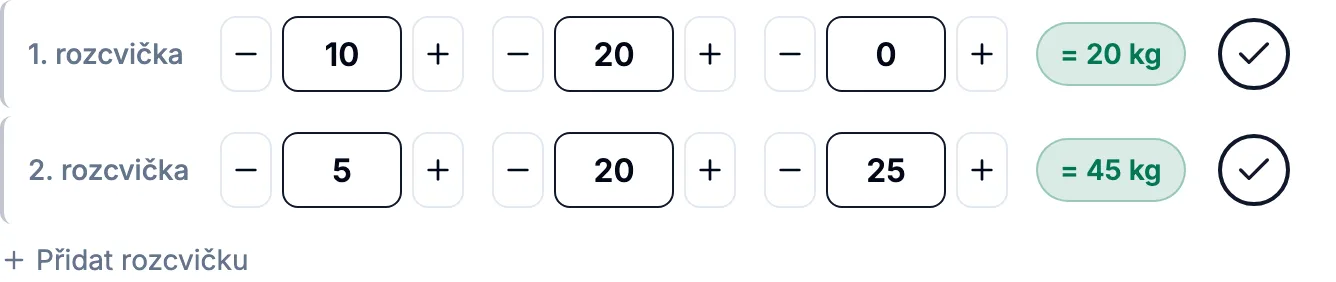
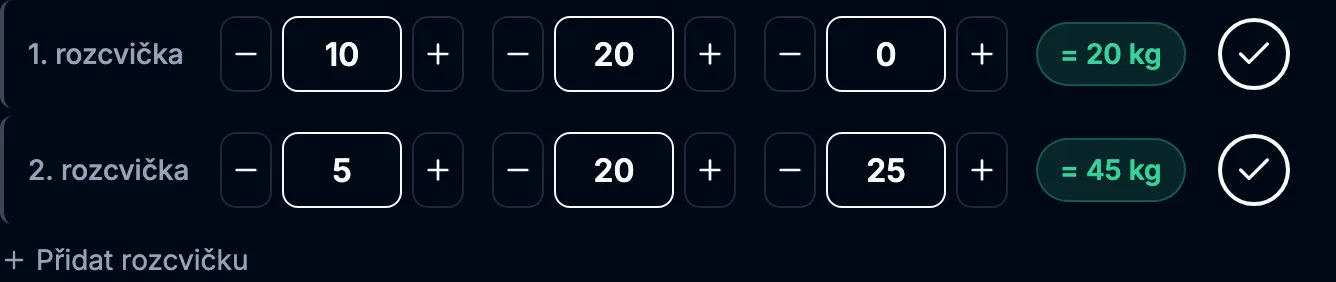
| Target weight | Sets | Suggested ramp (20kg bar) |
|---|---|---|
| 30 kg | 1 | 20 |
| 60 kg | 2 | 20, 42.5 |
| 100 kg | 3 | 20, 60, 85 |
| 140 kg | 4 | 20, 70, 105, 125 |
What the app computes during a workout
Weight suggestion (progression)
Every exercise in the workout detail carries a colored badge summing up what to do with the weight:
- Progress ↑You're adding load. When you're in the target range and it's going well, the app adds a rep; when you hit the top of the range, it adds weight (for fat loss/conditioning a set first, and once the sets are maxed out, weight again).
- HoldNothing added yet. Either the last workout was weaker than your recent best (the app takes you back to it), you dropped below the target range (get back into it), or your goal is “Maintenance”.
- NewAn exercise with no history — no suggestion, you enter the weight yourself.
Weight increment: compound (multi-joint) +2.5 kg, isolation +1 kg.
The green band is the target rep range. The weight step is +2.5 kg for compound exercises and +1 kg for isolation. For fat loss and conditioning, the top of the rep range adds a set first, and weight only at the top of the sets.


Exercises without weight
- Bodyweight: progression through reps and the number of sets, not through kg. For bodyweight exercises the app takes the last reps from your history and suggests one more rep on a progression.
- Cardio (rowing and the like): progression through time and distance.
- Mobility and stretching: no suggestion — just a prescription of sets × time.
Counting calories
The app uses a net MET model: it shows the energy above resting metabolism, not everything you would burn at rest.
The formula by exercise type:
- Strength exercises: MET rises with the load by the formula
MET + 3 × (load / body weight), capped at 10. - Running: 0.9 × body weight × km (ACSM estimate).
- Cardio and mobility: exercise MET × body weight × time.
- Rest between sets: (1.5 − 1) × body weight × rest time.
Planned = from the planned workout (number of sets × estimated work time). Done = from the sets actually logged in the workout detail. Once the first set is logged, both values are shown at once — for the whole workout “done ~120 / planned ~300 kcal”, and in short on the exercise's Energy row (“~120 / plan ~300 kcal”).
Without heart rate the estimate is rough (±20%). Intensity on strength exercises is computed as the load/body-weight ratio, not as % of 1RM.
Workout length estimate
When you have less time for a workout
When generating a single day, the “How much time do you have?” field offers the default No limit, or 15, 20, 30, 45 minutes. No limit keeps the regular build; the minutes are an upper bound on the planned estimate, not a target that has to be filled. Even 45 minutes won't stretch a workout that is normally shorter. The budget applies to this workout only; once it is created, the next generation starts again with no limit.
When shortening a workout, we preserve the baseline strength prescription: 3 working sets, reps, tempo and rest. We save time with fewer eligible exercises for the focus and the available equipment; with history on, recent load is still taken into account. More sets only uses time left after fitting this baseline. A shorter full-body workout may have less coverage, which you can see in the generation details.
The budget counts every enabled block including rest, 60 seconds for the initial setup and 30 seconds for each transition between exercises, blocks included. The reserve for setup and transitions is added only to workouts with a budget and is listed separately in the detail. The estimate depends on your pace; the real time may differ.
In the single-day form, turning the warm-up or cool-down off skips the whole block, pinned exercises included, for this workout only. An enabled block keeps its pinned exercises and counts their time. Choosing a shorter time on its own doesn't change these toggles. If the selected blocks and a suitable main part don't fit, the workout isn't created: the form keeps your choices and explains how much time is needed. You can raise the budget or adjust the blocks.
How we compute the estimate
Every exercise from every block is added up:
- Work = the exercise's TUT × reps. For exercises marked “/ side” the work time counts both sides (2×).
- Rest between sets — a base by exercise type (for mid-range reps, 6–12):
- Compound (multi-joint): 150 s
- Isolation (single-joint): 75 s
- Mobility / stretching: 15 s
- Cardio: 0 s
- For exercises with no reps (the “done” kind): a fallback of 30 s per set.
Planned = the whole planned exercise (number of sets × work time + rest). Done = the time actually logged for the sets completed so far. Once the first set is logged, both values are shown at once — for the whole workout “done ~1 / planned ~7 min”, and in short on the exercise's Time row (“~1 / plan ~7 min”).
An exercise tempo (e.g. 3010 = 4 s per rep) sharpens the estimate. Warm-up and cool-down time counts toward the workout's overall estimate, while the exercise count in the overview stays main-block only.
How your progress is measured
PR (personal record)
A record is not one number.
A weighted exercise has three axes that do not convert into one another, and each keeps its own maximum:
- Heavy — the heaviest weight lifted, regardless of the rep count.
- e1RM — the best estimate of your max by the Epley formula (weight × (1 + reps / 30)).
- Rep — the most reps in a single set. It applies to exercises without load, where there is nothing to weigh.
Heavy is the heaviest weight lifted, e1RM is the best estimate of your max (Epley: weight × (1 + reps / 30)) and Rep is the most reps on exercises without load. The axes neither add up nor compare with each other; each keeps its own record.


- Rowing: a record by pace over 500 m and by the longest distance. Pace is computed only from sets of 500 m and up.
- Holds and carries: the longest hold and the heaviest load that hit its target time.
- When a set beats your previous record, it gets a 🏆 badge naming the axis it moved.
Exercise history and charts
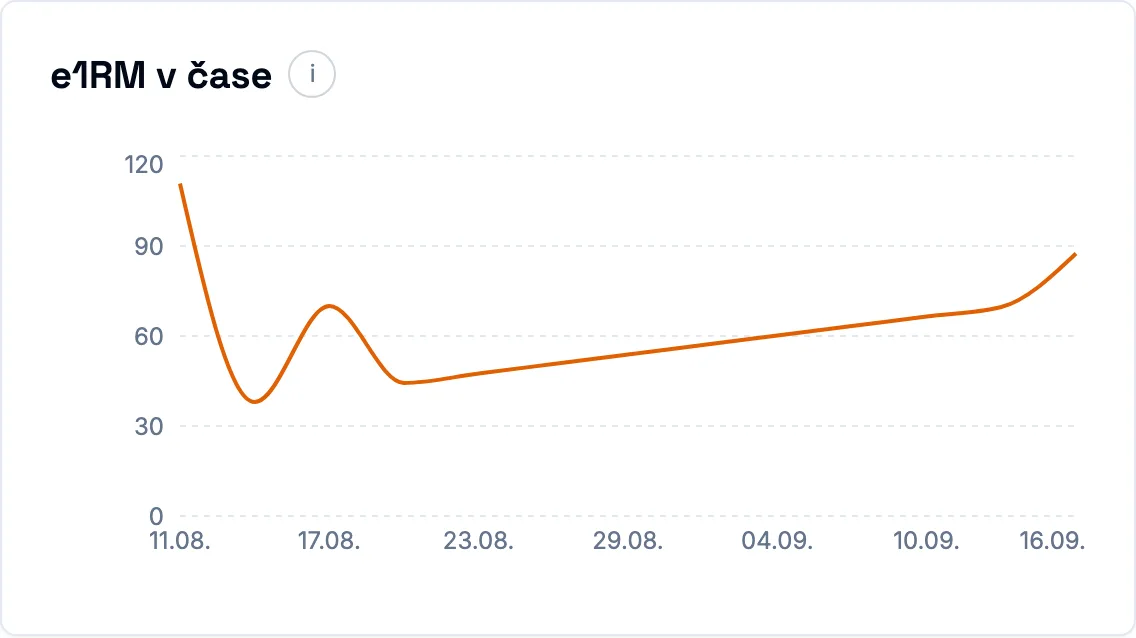
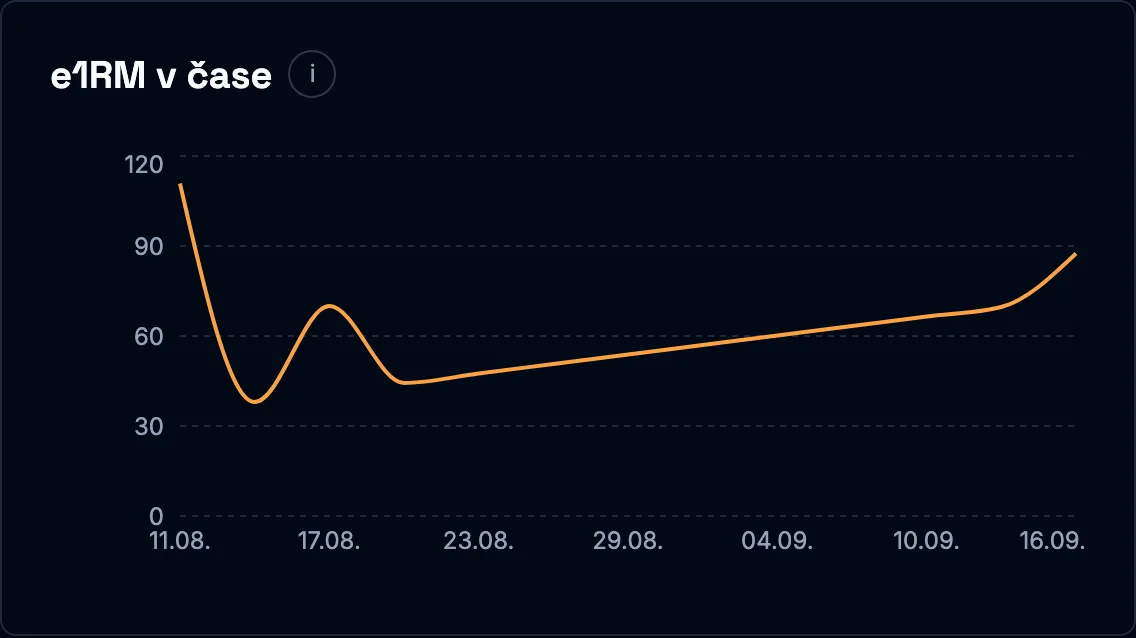
The History tab during a workout shows the last four workouts with logged sets. Next to them, weighted exercises get charts for up to the last ten available workouts, from oldest to newest. With a shorter history you see every available record. On mobile the chart sits below the list and you switch between Strength / Volume.
The strength estimate (e1RM) is the best estimate of a one-rep weight in a given workout: kg × (1 + reps / 30), rounded to whole kg. The tooltip also shows the set the estimate comes from. It is not a max you actually lifted. Volume per workout is the sum of reps × kg of this exercise's working sets. Kg here means total load lifted; higher volume alone does not mean better performance.
Only completed main-block working sets with a positive weight and reps go into the charts; warm-ups do not. The currently open workout is excluded from the history. Logged sets from another workout can show up even before that workout is marked done; the date follows its day in the calendar. Missing eligible sets are a gap, not zero performance. For exercises without load or measured by time, the history list stays.
Longer charts change neither the weight nor the hold-length suggestion: progression still comes from up to the last three workouts.
Exercise stats by measurement
On the exercise detail (the My progress and History tabs) the numbers follow how the exercise is measured, not which category it belongs to.
That is why rowing shows no kilograms and a plank no estimated max — there is nothing to compute them from.
- Weighted (dumbbells, machines): estimated max (e1RM), max weight, actual 1RM, best set volume and weekly volume in kg·reps.
- Bodyweight: max reps in a set, max reps per workout, total reps and the number of workouts.
- Distance and time (rower): pace per 500 meters, longest distance, total meters and total time. Pace is the only metric in the app where a lower number is better, so its axis is reversed — a rising line means improvement, like everywhere else. Only sets of 500 meters and longer count toward the pace record; a shorter sprint would set a value that steady work could never beat.
- Time under load (plank, dead hang, carries): the longest hold, total time under load and the heaviest load you performed the exercise with.
- Done only (mobility, stretching): the number of workouts, the number of sets and frequency by week. Reps show up only where the plan prescribed them.
A metric with nothing behind it in your data is not shown at all — instead of an empty tile with a dash. A carry performed for reps therefore has no hold tile, and its history table drops the whole time column.
The date in the history table links to the workout the record comes from. Record tiles link to the workout where the record was set.
Muscle analytics
One exercise usually works more than one muscle.
So the app splits a working set across muscle groups by the role the muscle plays in the movement. In the stats you see it as the “Muscle exposure” chart:
Stabilizers are not counted yet. That is why the sum of weighted sets is always smaller than the number of sets times the number of muscles worked — one more set adds 2.0 weighted sets, not 4.
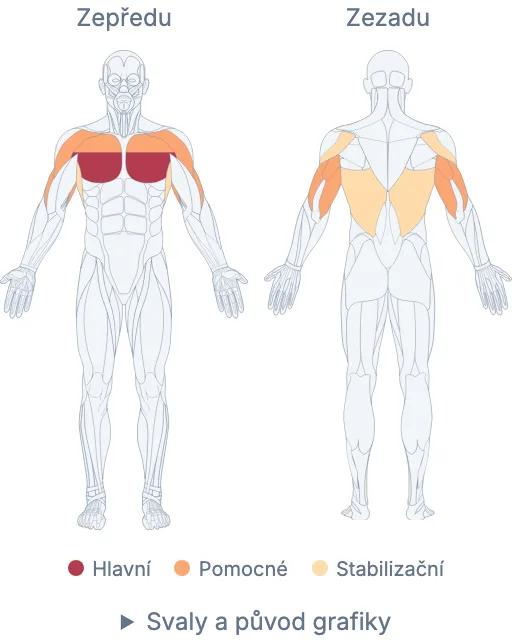
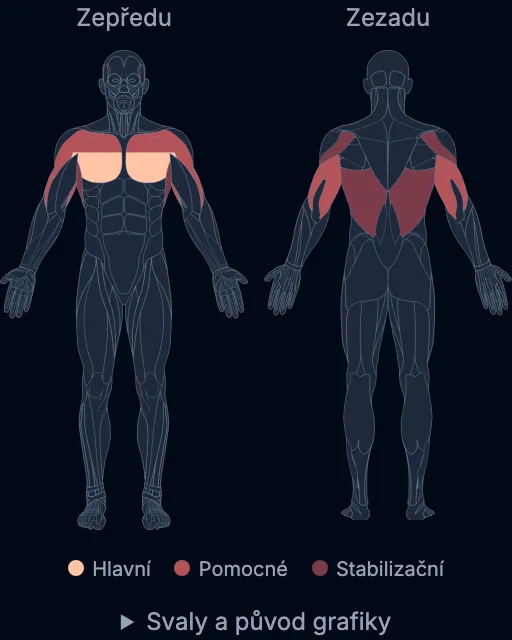
The exercise detail has three tabs: About holds the technique, equipment, muscles worked and related variants. My progress shows your metrics and charts, History the last workouts with a link to their detail. The selected period is shared by progress and history; the catalog muscle map does not depend on it. Both the tab and the period live in the link, so a page reload keeps them.
- Chest
- Shoulders
- Legs
Ø weighted sets / week →
- Green band = the target range of muscle exposure.
- Bar color: red = below target, green = on target, orange = above target.
- Clicking a bar opens the muscle's detail.
The target band (the green band) is a rough guide to how much muscle exposure a week is fine. It is derived from how many times a week you train the area — roughly 3 to 6 weighted sets per muscle group for each training day. It is the same for every muscle.
Muscle detail
Click a bar and you get three charts: muscle exposure over time, weighted strength volume in kg·reps and the top exercises that load the muscle most.
How the bar is computed:
- The prime mover gets a weight of 1, the full contribution, because it produces the exercise's main movement.
- A synergist gets a weight of 0.5, because it works actively in the movement but is not the main driver.
- A stabilizer holds a position or a joint. At a weight of 0 it is visible in the data, but it is not counted into the main volume charts yet.
Example: bench press
A bench press with 3 working sets credits the chest with 3 weighted sets. The triceps as a synergist: 1.5 weighted sets. Stabilizers are in the exercise's mapping, but they do not carry the main volume.
Physical sets are what you actually perform. Weighted sets are muscle exposure after the split by the muscle's role. kg·reps is strength volume with load; it is used wherever a set has a weight logged.
For bodyweight exercises (calisthenics) volume is measured in reps, not in kg·reps — weighted sets stay the metric shared across exercises. Cardio, mobility and stretching do not count into muscle analytics; they are measured in calories and workout length.
The engagement map on an exercise and a workout
You will find the same body map on the exercise detail, at the top of the workout detail and next to the data table of every exercise in a workout. Here the colors mark roles from the catalog: prime, synergist and stabilizer muscles per the legend. The shades adapt to the light and dark theme. It is not a count of performed sets nor an estimate of fatigue. The map works even before your first completed set.
The summary covers every exercise of the workout, including the warm-up and the cool-down. If a muscle has different roles across several exercises, the prime role wins, then synergist and finally stabilizer; neither the number of exercises nor of sets deepens the color. The map updates when you change the exercises. The collapsible list below the map also holds the muscles that are not visible on the body surface.
The muscle map over time
In the stats, move the timeline and you see the muscle map from the front and from the back. The “This day” mode shows the selected day, “Last 7 days” the selected day and the six days before it. What counts is the set's completion time in your device's local time, not the workout's planned date. The small figures under the days on the dashboard open the matching day.
The map counts completed working sets of strength exercises from the main block. Warm-up sets do not count. For one set, every single muscle gets 1 weighted set as the prime mover, 0.5 as a synergist and 0 as a stabilizer. The same muscle drawn on both sides of the body or in both views always carries the same value; it does not multiply the number of sets you performed. Individual muscle values do not add up to the number of physical sets.
Colors use a continuous “Heat” scale: in the light theme from peach through coral to maroon, in the dark theme a higher load gets lighter. The scale is fixed across days and modes and tops out at 12 weighted sets; higher values share the same end color, while the exact number stays on the muscle. That is what lets you compare days with each other. A neutral color means no counted contribution, not a recovered muscle. The seven-day total shows the work you did; it is not an estimate of fatigue or recovery.
Click a muscle to see the exercises and workouts that contributed to its value. Deep or covered muscles are in the list, marked “In detail”; their contribution does not color the neighboring surface muscle. The drawing is schematic and follows the exercise mapping in the catalog.
Catalog, edits and tools
Public exercise catalog
You can stay on the public web even after signing in. The “Open the app” button in the top bar takes you to your dashboard.
Exercises can be browsed without signing in. You will find descriptions, technique demos, the equipment needed and the muscles worked. You can search by name and filter by body part, type or difficulty.
Exercise families group related variants. Every family and every exercise has its own address you can share. Difficulty helps you find your way around the catalog; on its own it is not a recommendation of which variant to train.
Training plans, logged sets, personal stats and exercise bans belong to your account and are never shown publicly.
We measure visits to public pages by signed-out visitors using Google Analytics, automatically and without a banner. We also measure clicks to Berticka from the homepage, footer and guide, including link placement, language and the known destination page without URL parameters or fragments. We do not send private pages, email, account or training data to this measurement. Advertising measurement is disabled.
Planning and returning to forms
Generating a plan, adding a workout and the selected calendar day each have their own address.
You can save the link and after a page reload the same form or day opens again. For adding a workout the mode and the date are kept too. If you need to sign in, the app then returns you to the original link.
The browser's Back and Forward buttons step through the screens you opened. From one-day generation you can open the multi-day plan and go Back to the choices you had in progress, including the time budget.
The link does not store the name you typed or the form's other unsaved choices; fill them in again after a reload. Opening the link by itself creates no workout.
After a page reload (F5) and when going Back and Forward, the scroll position is restored in the same browser tab as soon as the content loads. If you start scrolling the page yourself while it loads, the automatic restore is canceled. Moving to another page starts at the top; a link to a specific section takes you straight to it.
Move, swap or delete an exercise
During a workout you can reorder exercises by dragging the handle next to the name or with the up and down arrows.


The handle works with a mouse and with touch on mobile. Exercises always move within the same block: the warm-up, the main block or the cool-down. A completed or skipped workout can no longer be reordered.
The new order is saved immediately. Logged sets, values you have typed in and a running rest countdown are all kept. If saving fails, the original order comes back and you can repeat the move.
Every exercise in the workout detail has a “Swap exercise” and a “Delete” button. The alternatives in the dialog are filtered by the same target muscle group and by the equipment in your profile. After a swap, you stay in the same place in the workout; the expanded card and drafts for other exercises are preserved.
When an exercise does not suit you (a shoulder limitation, missing gear), just click “Swap” — the app offers you the closest equivalent.